Tricks for better looking $\LaTeX$
Tricks for better looking $\LaTeX$
Better Subfigure
required package: \usepackage{subcaption,graphicx}
1
2
3
4
5
6
7
8
9
10
11
12
13
14
15
16
17
18
19
20
21
22
23
\begin{figure}[ht]
\centering
\begin{minipage}[b]{.45\textwidth}
  \centering
  \begin{picture}(0,0)
    \put(-10,120){\textbf{a)}}
  \end{picture}
  \includegraphics[width=.95\linewidth]{fig1.png}
  \phantomsubcaption
  \label{fig:fig1}
\end{minipage}
\begin{minipage}[b]{.45\textwidth}
  \centering
  \begin{picture}(0,0)
    \put(-10,120){\textbf{b)}}
  \end{picture}
  \includegraphics[width=.95\linewidth]{fig2.png}
  \phantomsubcaption
  \label{fig:fig2}
\end{minipage}
\caption{Caption}
\label{fig:fig}
\end{figure}
which looks like this: 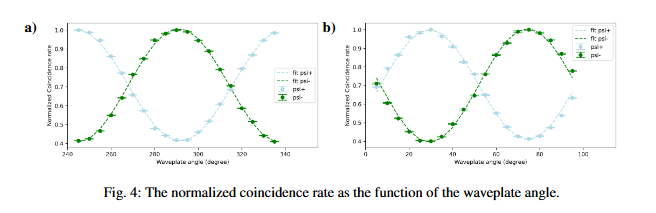
the ‘120’ in
\put(-10,120){\textbf{b)}}is not the same for all the figures. You should find the proper number.
Floating Figure/Table Surrounded by Text
If you want to have more freedom in showing the figure, you can try \usepackage{subcaption,graphicx,wrapfig} Then, use this to insert figure:
1
2
3
4
5
6
7
8
9
10
11
12
13
14
15
16
17
18
19
20
21
22
\begin{wrapfigure}{l}{4.8cm} % 靠文字内容的左侧
\begin{minipage}[b]{.32\textwidth}
  \centering
  \includegraphics[width=.95\linewidth]{fig1.png}
  \begin{picture}(0,0)
    \put(-140,95){\textbf{a)}}
  \end{picture}
  \phantomsubcaption
  \label{fig:fig1}
\end{minipage}
\begin{minipage}[b]{.32\textwidth}
  \centering
  \includegraphics[width=.95\linewidth]{fig2.png}
  \begin{picture}(0,0)
    \put(-140,95){\textbf{b)}}
  \end{picture}
  \phantomsubcaption
  \label{fig:fig2}
\end{minipage}
\caption{Caption}
\label{fig:fig}
\end{wrapfigure}
This also include the subfigure and the ‘a)’, ‘b)’ text.
There may be errors when referring the figures.
For tables, things are similar to figure with wraptable instead of wrapfigure:
1
2
3
4
5
6
7
8
9
10
11
12
13
14
\begin{wraptable}{r}{6cm}
\vspace{-6mm}
 \centering \caption{Table Caption}\label{tab:table}
 \vspace{-2mm}
\begin{tabular}{ccc}
    \hline
    a & b & c \\
    \hline
    $1$ & $2$ & $3$ \\
    $4$ & $5$ & $6$ \\
    \hline
   \end{tabular}
\vspace{-2mm}
\end{wraptable}